
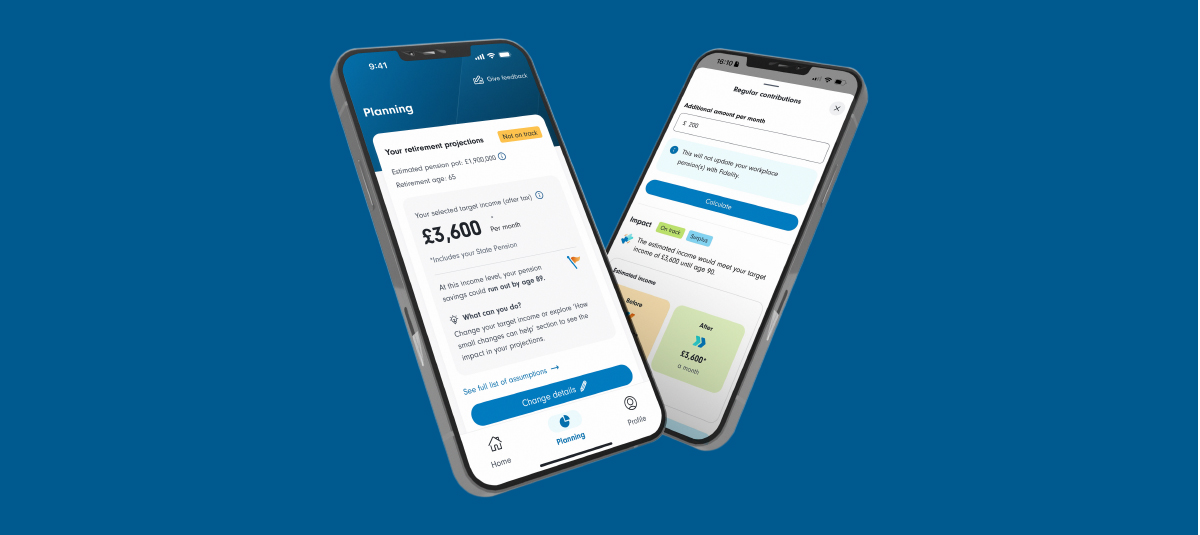
Your new way to plan for life
If you have a workplace pension with Fidelity, your PlanViewer app is now even better.
A new interactive tool for comparing the possibilities
In your PlanViewer app, you'll find a simple but powerful tool in the Planning tab. It’s been designed to be easy to use, while doing some complex calculations behind the scenes.
All you have to do is answer a few straightforward questions and you will be able to see if you are on track for your desired income in retirement. Getting a clearer, personalised view of your future can help you plan for life with greater confidence and decide what steps to take next.
And, everything you enter is saved in-app, so you can come back and update or change it whenever you like. This makes it easier to stay on track over time, rather than thinking about your plans as a one-off task.
The tool shows how your current savings and selected retirement age compare against the income you’re hoping for in retirement.
This makes it easier to understand whether you’re likely to meet your goal, or if there might be a gap. It’s not about getting everything perfect straight away, but about avoiding unwelcome surprises in the future.
The tool helps you explore different options and understand how updating amounts and timings could affect your money and your future.
It gives you a clearer picture of what different paths might look like, so you can move forward feeling informed and confident.
Log in securely and come back whenever you like to update your details. As things change, you can revisit and update to see how your future might look when you retire.
New to PlanViewer? It’s simple to get started, first download the iOS or Android app, and then register with your Fidelity Reference Number and your National Insurance Number. You’ll be able to manage your workplace pension and access the new planning tool all in one place, whenever you like.
Plan for life FAQs
The projection created by the tool uses information we hold about you, plus any additional details you choose to add. It’s also based on multiple assumptions, such as your future contributions, investment growth and charges.
Your projected retirement savings are shown in future money terms, representing the amount you could have at retirement. This figure isn't adjusted for future inflation, so although the amount may appear higher than today’s value, it may not buy as much in the future as the same amount would buy today.
This is for illustrative purposes only and is not a guarantee of future performance or retirement outcomes. Your actual retirement savings could be higher or lower depending on factors such as investment performance, your contributions, charges, and changes in your personal circumstances.
The tool shows how your projections compare against the income you’re hoping for in retirement. Your projection is based on the information we hold about you, plus any additional details you choose to add, and a range of assumptions used within the tool, including State Pension.
The results may show you as ‘on track’ if your estimated income meets or exceeds your target income at retirement. Or if your estimated income is below your target income, it will show you that you are ‘Not on track’.
The monthly income estimate is shown in today's prices, after tax has been deducted and includes an adjustment for inflation, giving you an estimation of how much you will receive in real terms.
This is for illustrative purposes only and it’s not a guarantee that you will achieve your target income and, therefore, should not be relied upon as financial advice. Your actual retirement savings could be higher or lower depending on factors such as investment performance, your contributions, charges and changes in your personal circumstances.
Your Annual Statement and the planning tool in PlanViewer use different information, assumptions and calculation methods, so the results may vary.
Your Annual Statement is based on Statutory Money Purchase Illustration rules and shows values in today’s prices, so the projection is based on information available at a specific point in time. The tool uses information about you, any additional information you choose to add, and a range of assumptions, including future investment growth and inflation, to estimate what your retirement savings could be worth when you retire. Your estimated pension savings are shown in future prices, meaning it reflects the estimated value of your savings at retirement and may therefore be higher than an equivalent figure expressed in today's prices.
Both projections are for illustrative purposes only and it’s not a guarantee that you will achieve your target income and, therefore, should not be relied upon as financial advice or as a prediction of future outcomes. Your actual retirement savings could be higher or lower depending on factors such as investment performance, your contributions, charges and changes in your personal circumstances.